Monday, 2 June 2014
Friday, 23 May 2014
Extension Method
An extension method is
a special kind of static method that allows you to add new methods to
existing types without creating derived types.
The extension methods
are called as if they were instance methods from the extended type, For
example: x is an object from int class and we called it as
an instance method in int class.
It represents static
methods as instance methods. An extension method uses the this-keyword in its
parameter list.
It must be located in
a static class and static method.
How
to Create my Extension Method?
Simply, you create
your own static method in your class and put this keyword in front of the
first parameter in this method (the type that will be extended).
namespace LooslyCoupled
{
public static class MyMathExtension
{
public static int? NullCheck(this int? x)
{
return x == null ? 0 : x;
}
}
}
namespace LooslyCoupled
{
class Program
{
static void Main(string[] args)
{
int? a = 100;
int? b=a.NullCheck();
Console.WriteLine("Value A =
"+ a.NullCheck());
Console.WriteLine("Value B =
" + b);
a = null;
Console.WriteLine("Value A is
null = " + a.NullCheck());
Console.Read();
}
}
}
General
Tips in Extension Methods Usage
This
section is optional reading section for understanding the core idea of
extension methods:
a. This keyword has to be the first parameter in the
extension method parameter list.
b. Extension methods are used extensively in C#
3.0 and further version specially for LINQ extensions in C#, for example:
int[] aa = { 1, 4, 5, 3, 2, 6 };
var result = aa.OrderBy(g =>
g);
Here,
order by is a sample for extension method from an instance of IEnumerable interface, the expression inside the parenthesis is a lambda
expression.
c. It is important to note that extension methods
can't access the private methods in the extended type.
d. If you want to add new methods to a type, you
don't have the source code for it, the ideal solution is to use and implement
extension methods of that type.
e. If you create extension methods that have the
same signature methods inside the type you are extending, then the extension
methods will never be called.
Labels:
OOPs
Sunday, 18 May 2014
User control execution order?
Step 1: A Master page Int and PreLoad.
Step 2: An ASPX web form page Int,PreLoad and Load.
Step 3: A master page Load
Step 4: User control inside the page Int, preLoad, Load.
Step 5: Button to fire some code in a btnOK_Click event.
Thursday, 15 May 2014
What is AutoEventWireup?
The ASP.NET page framework also supports an automatic way to associate page events and methods. If the AutoEventWireup attribute of the Page directive is set to true (or if it is missing, since by default it is true),
- AutoEventWireup is an attribute in Page directive.
- AutoEventWireup is a Boolean attribute that indicates whether the ASP.NET pages events are auto-wired.
- AutoEventWireup will have a value true or false. By default it is true
<%@ Page Language="C#" AutoEventWireup="true" CodeBehind="Default.aspx.cs"Inherits="WebApplication2._Default" %>
the page framework calls page events automatically, specifically the Page_Init andPage_Load methods. In that case, no explicit Handles clause or delegate is needed.
Example 1
With AutoEventWireup="true"
Code
protected void Page_Load(object sender, EventArgs e)
{
Response.Write("Sri");
}
protected void Button1_Click(object sender, EventArgs e)
{
Response.Write("
Button Click");
Button Click");
}
When we click Button then both page load and button click event get fired.
OUTPUT
Sri
Button Click
Button Click
Example 2
With AutoEventWireup="false"
Now set the AutoEventWireup propoerty false
Again click the Button Event this time only click event get fired.
OUTPUT
Button Click
Wednesday, 14 May 2014
stringbuilder vs string in c#
String
String is immutable. Immutable means once we create string object we cannot modify. Any operation like insert, replace or append happened to change string simply it will discard the old value and it will create new instance in memory to hold the new value.
Example
string str = "hi";
// create a new string instance instead of changing the old one
str += "test";
str += "help";
String Builder
String builder is mutable it means once we create string builder object we can perform any operation like insert, replace or append without creating new instance for every time.
Example
StringBuilder sb = new StringBuilder("");
sb.Append("hi");
sb.Append("test ");
string str = sb.ToString();
Differences between Hashtable and Dictionary
Dictionary:
- It returns error if we try to find a key which
does not exist.
- It is faster than a Hashtable because there is
no boxing and unboxing.
- Only public static members are thread safe.
- Dictionary is a generic type which means we
can use it with any data type.
Example:
Dictionary dictionary = new Dictionary();
dictionary.Add("cat", 2);
dictionary.Add("dog", 1);
dictionary.Add("llama", 0);
dictionary.Add("iguana",
-1);
//dictionary.Add(1, -2); // Compilation Error
foreach (KeyValuePair pair in dictionary)
{
lblDisplay.Text = pair.Value + " " + lblDisplay.Text;
}
Hashtable:
- It returns null if we try to find a key which
does not exist.
- It is slower than dictionary because it
requires boxing and unboxing.
- All the members in a Hashtable are thread
safe,
- Hashtable is not a generic type,
Example:
Hashtable objHashTable = new Hashtable();
objHashTable.Add(1, 100); //
int
objHashTable.Add(2.99, 200); // float
objHashTable.Add('A', 300); //
char
objHashTable.Add("4", 400);
// string
lblDisplay1.Text = objHashTable[1].ToString();
lblDisplay2.Text = objHashTable[2.99].ToString();
lblDisplay3.Text = objHashTable['A'].ToString();
lblDisplay4.Text = objHashTable["4"].ToString();
dictionary.Add("cat", 2);
dictionary.Add("dog", 1);
dictionary.Add("llama", 0);
dictionary.Add("iguana", -1);
//dictionary.Add(1, -2); // Compilation Error
foreach (KeyValuePair
{
lblDisplay.Text = pair.Value + " " + lblDisplay.Text;
}
Monday, 12 May 2014
Which exception will catch first and what about finally statement?
try
{
int b = 0;
int c = 10 / b;
}
catch (Exception e)
{
}
catch (DivideByZeroException ae)
{
}
finally
{
}
It is throw compile time error
Exception Message:
Error 1 A previous catch clause already catches all exceptions of this or of a super type ('System.Exception')
Saturday, 10 May 2014
SharePoint 2010 Managed Metadata Configuration and Association
Step 1: Setup Term Store Administrator
Open the Central Administration website and click the Manage Service Applications link.
Step 2: Click New Button.
Step 2: Select Managed Metadata Service
Step 3: Now Create New Managed Metadata service window opened, after fill Name, Database Server, database name ect...
Step 4: My managed metadata is Created.
Step 5: Goto Site Settings-> Click Term Store Management Tool.
Step 6: Right Click My managed metadata Create new Group.
Step 7: Created City GROUP here.
Step 8: Create a New Document Library.
Step 9: Add column of managed metadata
Step 10: Select your Metadata
Step 11: Click Ok button.
Step 12: Upload your file.
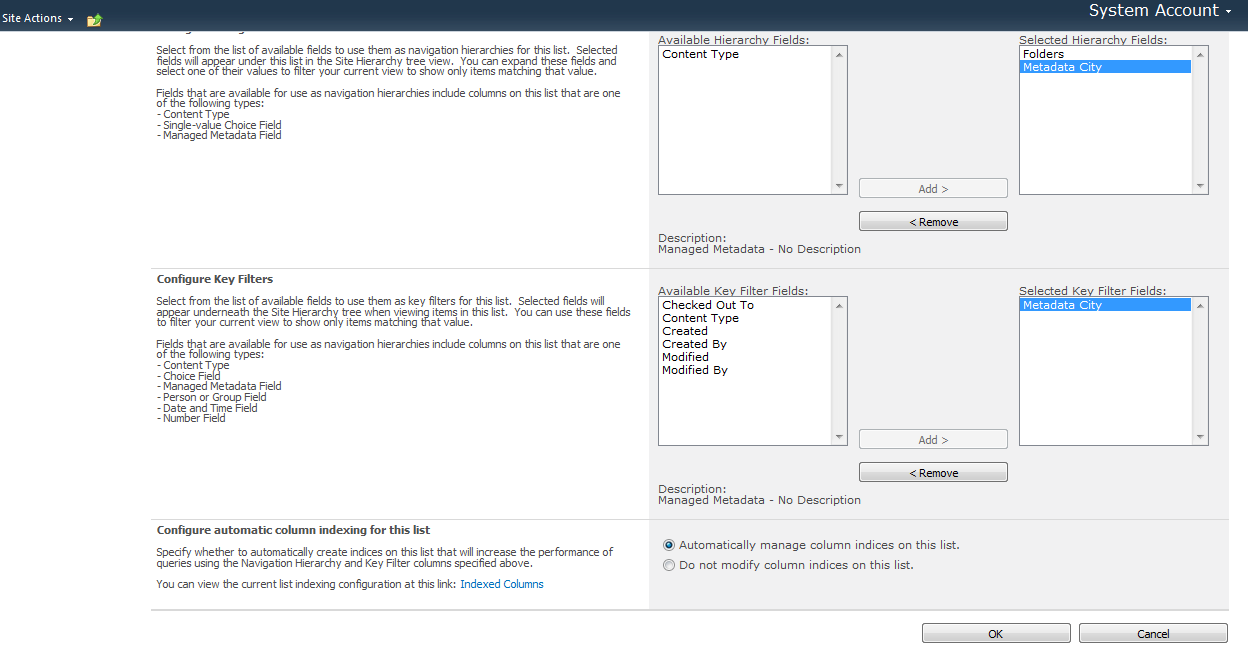
Step 13: Select your CITY
Step 14: Your file list.
Step 15: Goto Document Library Settings-> Metadata Nacigation Settings.
Step 16: Output :) If you select "T Nagar", Only T nagar file display.
Labels:
MOSS
Differece between ds.clone and ds.copy?
The Clone method of the DataSet class copies only the schema of a DataSet object. It returns a new DataSet object that has the same schema as the existing DataSet object, including all DataTable schemas, relations, and constraints. It does not copy any data from the existing DataSet object into the new DataSet.
The Copy method of the DataSet class copies both the structure and data of a DataSet object. It returns a new DataSet object having the same structure (including all DataTable schemas, relations, and constraints) and data as the existing DataSet object.
private DataSet CreateClone(DataSet myDataSet, string myTable, string myCol, decimal myValue) { DataSet myCloneDS; myCloneDS = myDataSet.Clone();DataRow[] copyRows = myDataSet.Tables[myTable].Select(myCol + " = " + myValue); DataTable custTable = myCloneDS.Tables[myTable]; //Insert into all filtered row data into the cloned Dataset foreach (DataRow copyRow in copyRows) custTable.ImportRow(copyRow); return myCloneDS; }
Monday, 21 April 2014
Anonymous access allows users to view the pages on this site without logging in
Step 1: Enabling the anonymous accesss to the Web application from Central Admin. This does not mean that the whole web application is now anonymous. This step signifies that, this web application has ability to host resources that can be accessed by Anonymous user.
With out user name password we can login site.
Labels:
MOSS
Subscribe to:
Posts (Atom)